


This post was sponsored by Trendos. The opinions expressed in this article are the sponsor’s own. If you want to go further, accessibility tree: how AI agents see your website covers it in detail.
Are my competitors running ChatGPT ads?
Is there an ad library for ChatGPT sponsored results?
How do I track who’s advertising in AI answers?
Your highest-intent buyers are asking ChatGPT about your category right now.
A sponsored placement appears below the answer, and if a competitor bought it, they’re intercepting clicks at the exact moment buyers are ready to decide.
Unless you run every relevant prompt yourself, competitors are undermining your AI visibility in the moments that matter most, and you can’t see any of it.
What This Walkthrough Covers
This is a walkthrough of the manual process to find out who’s bidding against your category, and where you can see exactly who’s buying ads in your customers’ ChatGPT answers without doing it yourself.
OpenAI launched ChatGPT ads for US Free and Go users on February 9, 2026.
By spring, 600+ advertisers had placements running against high-intent prompts:
- Software comparisons.
- Weekend trip planning.
- “What’s the best crm tool?”
These queries used to live on Google; now they showcase inside of ChatGPT as ads.
ChatGPT ads appear inside the answer experience as a sponsored card below the response.
After ChatGPT answers a prompt, a sponsored card renders below the response, visually separated and clearly labeled “Sponsored.” The card includes the advertiser name, favicon, a short headline, a tight body description (~19 words on average), and a link to a destination page.
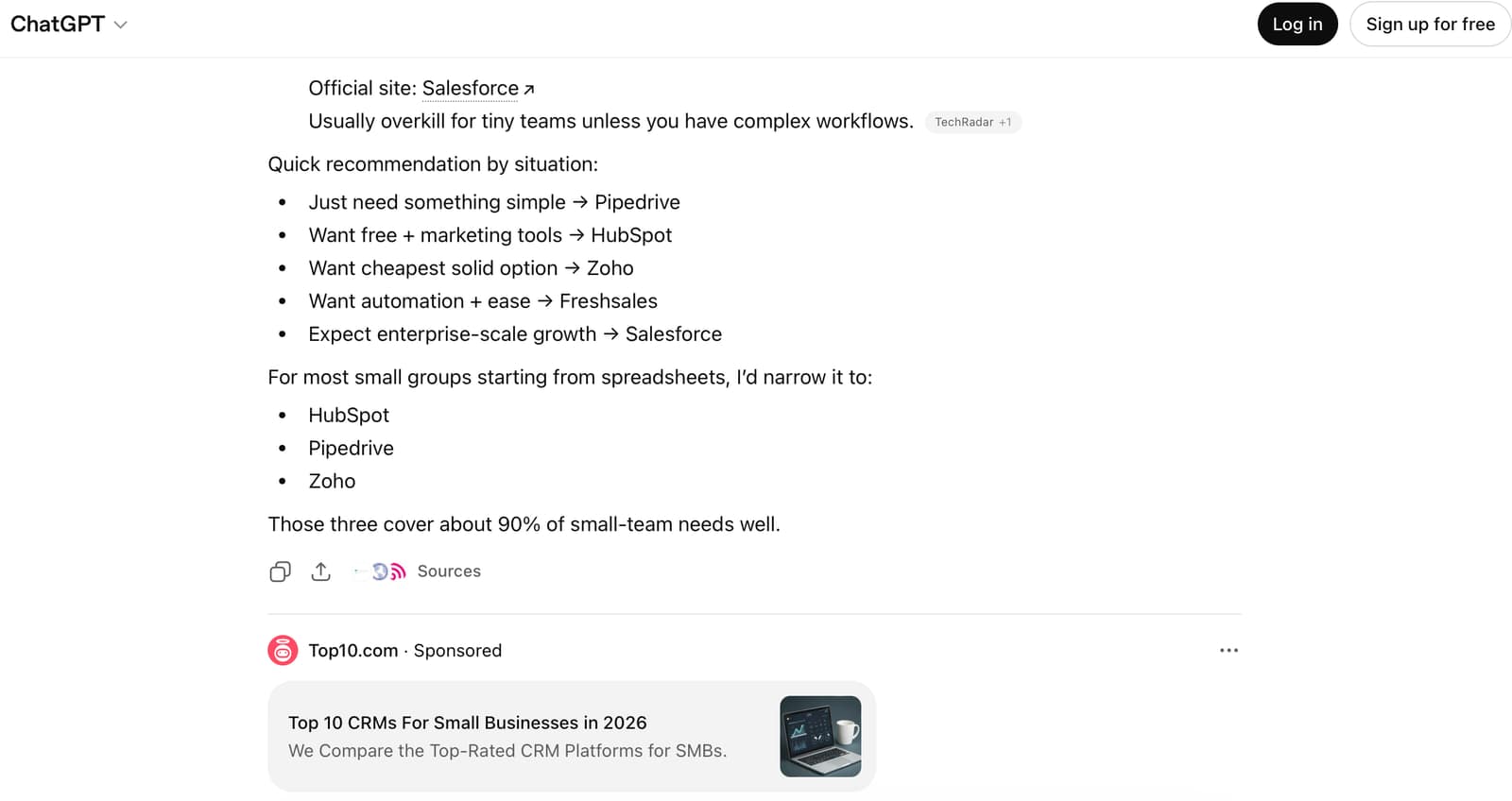
OpenAI does not currently publish an ad library equivalent to Meta’s or Google’s, and no central searchable database of every active ChatGPT ad exists. To see who’s running ads, you have to run prompts in eligible US sessions and capture what appears.
For monitoring purposes, four data points define what a competitor is doing in a given ad:
- Ad title: the headline copy a competitor is running
- Ad description: the body sentence(s) under the headline
- Final URL: the destination they’re sending traffic to
- Impression share: how often a competitor’s ad shows on a given prompt across many runs
You need all four to read the competitive picture.
Title and description tell you how they’re positioning.
Final URL tells you whether they’re sending to a generic homepage, a category page, or a comparison.
Impression share, the percentage of total ad impressions on a given prompt that went to a specific advertiser, turns “I saw them once” into “they own this prompt.”
For competitive intelligence it matters more than raw impression counts because it normalizes across prompts with different ad fill rates.
Step 1: Map The Queries Your Buyers Are Already Asking
Build a prompt list that represents how your buyers actually talk to ChatGPT. You’re not optimizing for impressions on broad terms. You’re surfacing competitor activity on the conversations that lead to your category.
Start with the questions you already know convert in paid search and high-intent organic.
Then translate them into how someone would phrase the same need to ChatGPT. People don’t search ChatGPT the way they search Google. They write full sentences with context, constraints, and intent.
A working prompt list for a paid search manager in any commercial category should hit 30 to 50 prompts and cover:
- Direct comparisons (“best [category tool] for [use case]”, “[Brand A] vs [Brand B]”).
- Recommendation prompts (“I need a [tool] for [job to be done], what should I look at?”).
- Switching prompts (“alternatives to [Brand]”).
- Use-case fit prompts (“which [tool] is best for [small team / enterprise / specific industry]”).
- Pricing prompts (“affordable [tool] for [audience]”).
- Long-tail edge cases (“[tool] that integrates with [niche stack]”).
Pull from your branded and category SQL data, top organic keywords, and any customer-facing inputs you have (support tickets, sales calls, on-site search logs, review mentions), so the list represents real buyer language, not what you assume they say.
If your competitors are bidding on prompts you haven’t mapped, you’ll never see them; your ad library starts and ends with your own prompt list.
Pro Tip: Use Ad Radar to pull in your prompt list and keep it running continuously.
Step 2: Run Each Prompt In A ChatGPT Session
Once you have the prompt list, run it, and pay attention to the session setup, where the data either becomes useful or becomes noise.
Run each prompt and screenshot the response, including any sponsored card that appears below the answer.
Do not run each prompt once.
ChatGPT’s ad auction doesn’t show the same ad to every user on the same prompt; different sessions surface different advertisers depending on bid, relevance signals, and rotation.
A single run captures one auction outcome, not the competitive set.
To get a usable read on any given prompt, plan for at least 20 to 30 runs across multiple days.
Vary the session: clear cookies between batches, and pace runs across mornings, afternoons, and evenings. Run all 30 in 10 minutes from the same session and you’re sampling one slice of the auction.
Step 3: Capture The Four Data Points That Define A Competitor’s Ad
For every sponsored placement that shows up, record the same four fields, in the same place, every time. Otherwise you can’t compare across runs.
The four data points to capture per impression:
- Ad title: the exact headline copy in the sponsored card. Copy character for character. Headlines change.
- Ad description: the body sentence(s) under the headline. Roughly 19 words on average right now, but range varies. Capture the full text.
- Final URL: the destination URL the card links to. Strip UTMs to identify the canonical landing page, but keep the full URL in a secondary column so you can analyze tracking patterns later.
- Impression share: calculated, not observed directly.
For each prompt, count how many times each advertiser appeared out of total runs. If you ran a prompt 25 times and Competitor A showed in 12 of them, that’s a 48% impression share on that prompt for the run window.
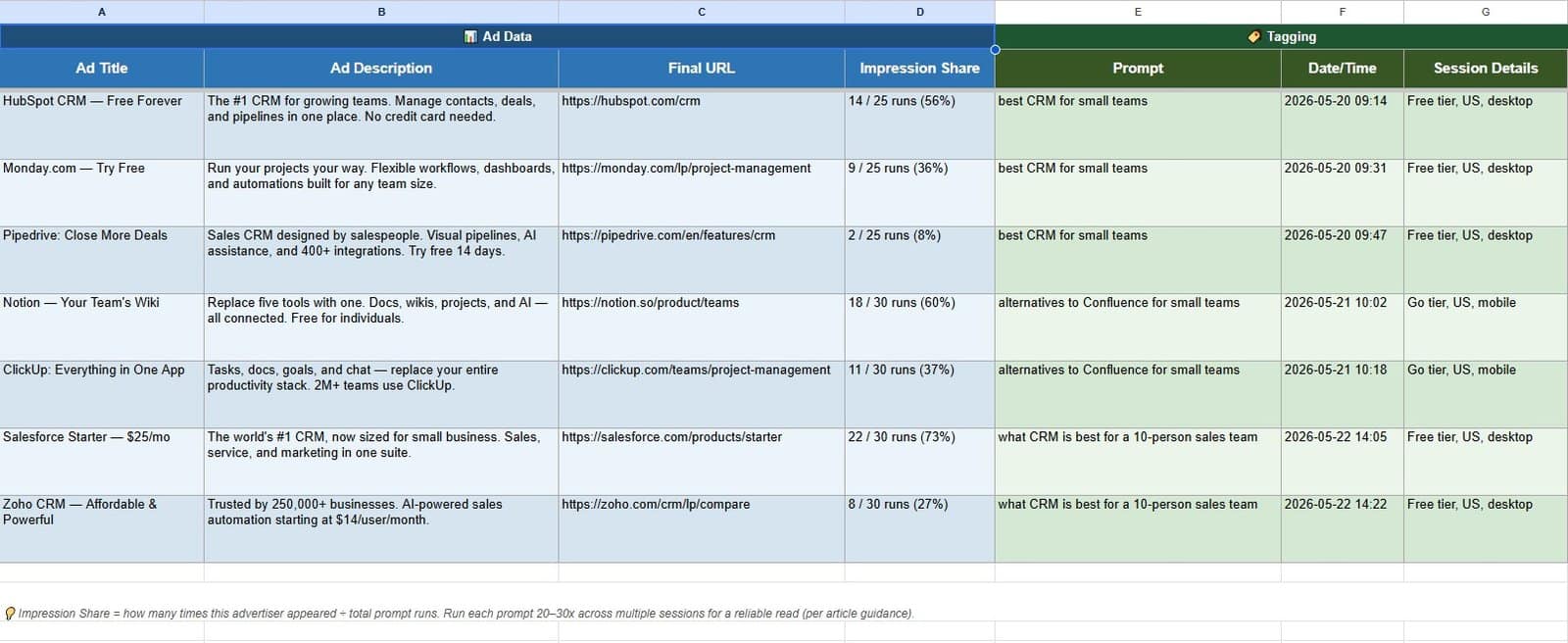
Tag each row with the prompt that triggered the ad, the date and time of the run, and the session details (Free or Go, Location). Set up your spreadsheet so you can pivot impression share by prompt, by competitor, and by week.
Ad copy iterates fast. The same advertiser may run three or four different titles against the same prompt within a single week as their team tests creative. Final URLs change too; a competitor might rotate between a homepage, a comparison page, and a category landing page to test conversion. Capture only the title and you miss the iteration patterns and the URL strategy, which is most of what tells you what your competitor is doing.
Step 4: Repeat Often Enough To See Share Of Voice Over Time
A one-shot read on competitor ad activity will mislead you. You’ll catch whoever happened to win the auction the day you ran prompts and miss the rotation that happens every other day. Decide on budget from a single-day snapshot and you’re deciding on noise.
To see the share of voice, meaning who actually owns this category in ChatGPT, you need a recurring cadence. The minimum that gives you signal:
- Daily runs on your top 5 to 10 highest-value prompts (the queries closest to purchase intent)
- Weekly runs on the full 30–50 prompt list
- Monthly trend pulls to see how competitors gain or lose share over rolling 30-day windows
Pro Tip: Use Ad Radar to run this cadence automatically and get a continuous read on competitor ad activity in ChatGPT, without the spreadsheet overhead.
Stop Flying Blind In Paid AI Search
Paid search managers have auction insights, ad libraries, and dozens of third-party monitoring tools for Google. For ChatGPT ads, they have none of that yet. ChatGPT ads are a new auction running against the same buyer intent, and right now most teams don’t have visibility into who’s bidding against them. If competitors are already in your customers’ ChatGPT answers, you’ll find out from your own monitoring or from a pipeline gap you notice too late to act on.
Ad Radar runs the prompt monitoring continuously and surfaces every advertiser, every prompt, every creative iteration. See continuous visibility into competitor ChatGPT ad activity in your category.
Image Credits
Featured Image: Image by Shutterstock. Used with permission.