


I was digging through a Google Analytics 4 account recently, broke the traffic down by source and medium, and saw something that made me stop scrolling. The same source, chatgpt.com, was sitting in three different channels at once. Not three different sources. One source, scattered across three channels, in the same report. If you’ve got GA4’s new AI Assistant channel, there’s a good chance the exact same thing is happening in your data right now. And it means the AI traffic number you’re reporting is almost certainly wrong.
AI traffic is still a small slice for most sites, but it converts well above its weight: Similarweb’s clickstream data has ChatGPT referrals converting at around 7%, ahead of organic search and not far behind paid. A high-intent channel that small is worth measuring properly rather than eyeballing it. Let me show you why it fragments, and how to fix it.
So What Did Google Actually Change?
On May 13, 2026, Google added a native AI Assistant channel to GA4’s Default Channel Group. The idea is simple. When GA4 spots a referrer it recognizes as an AI assistant, it tags the session with the medium ai-assistant, drops it into the AI Assistant channel, and stamps the campaign as (ai-assistant). No setup, no regex, nothing for you to build. It rolled out gradually and reached most properties by early June 2026.
If you spent the last year stitching together custom regex just to see your AI traffic, that’s a genuine win. Before this, those visits sat in Referral, or in Direct when the referrer was missing.
But here’s the catch, and it’s hiding in the word “recognizes.” The list of platforms Google recognizes keeps moving. At launch, it named ChatGPT, Gemini, and Claude. By June, the live documentation listed a different set (ChatGPT, Gemini, DeepSeek, Copilot, and Grok), with Claude quietly dropped. Perplexity, one of the highest-intent AI sources going, still isn’t on the list and keeps landing in Referral. So don’t hard-code a platform list into a client report. Check Google’s channel definitions on the day you publish, because they change.
1 Source, 3 Channels: The Problem Hiding In Your Reports
Back to that screenshot. The reason a single source splits across three channels is that GA4 decides the channel using source and medium together, not source on its own. Add Session source/medium as a dimension, and you can watch chatgpt.com break into three:
chatgpt.com / ai-assistantlands in AI Assistant. This is the slice GA4 recognized and tagged.chatgpt.com / referrallands in Referral. These are the sessions GA4 didn’t tag, plus anything that arrived before the channel switched on for your property (remember, the rollout dragged into June).chatgpt.com / (not set)lands in Unassigned, the channel almost nobody ever opens. Google’s own rule is blunt here: when source/medium comes through as (not set), there’s no channel rule to catch it, so it falls into Unassigned.
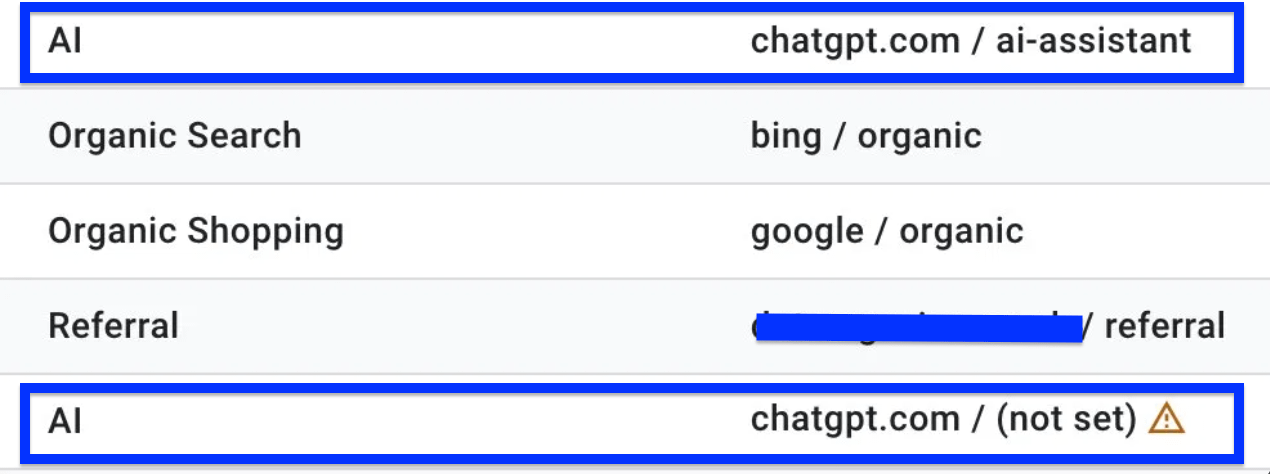
Why would a source you clearly recognize turn up with no medium? In my experience it’s usually the ChatGPT app and its in-app browser. As MarTech has documented, links opened inside those embedded browsers tend to strip the referrer, so GA4 hangs on to the source but loses the medium.
So your real ChatGPT number isn’t in one place. It’s smeared across three channels, and one of them is a bucket you probably never check. Read the AI Assistant channel on its own, and you’ll undercount every single time.
Why The Obvious Fixes Don’t Work
There are three instinctive fixes here, and I wouldn’t lean on any of them:
- Just read the AI Assistant channel. It misses the Referral and Unassigned slices of the very same traffic, and it ignores Perplexity completely.
- Compare this month to last. The native channel only counts forward from the rollout date, and it switched on at different times for different properties. So any range reaching back into spring 2026 is comparing tagged traffic against untagged traffic. That’s not a trend; it’s an artifact.
- Check your rank tracking. Different question entirely. Rankings tell you about position, not whether an assistant actually sent someone to your site.
The Fix: 1 Custom Channel That Matches On Source
Here’s the move that actually solves it. Build a custom channel group and match for source while ignoring medium completely. The second you do that, the ai-assistant, referral and (not set) versions of chatgpt.com collapse into a single line.
You get two bonuses on top. A custom channel group applies its rules retroactively across your whole date range, so it rescues all those old ChatGPT sessions stuck in Referral. And because you’re writing the rule, you can include the platforms Google leaves out, Perplexity included.
Here’s how I set it up:
1. Go to Admin > Data display > Channel groups and create a new group.
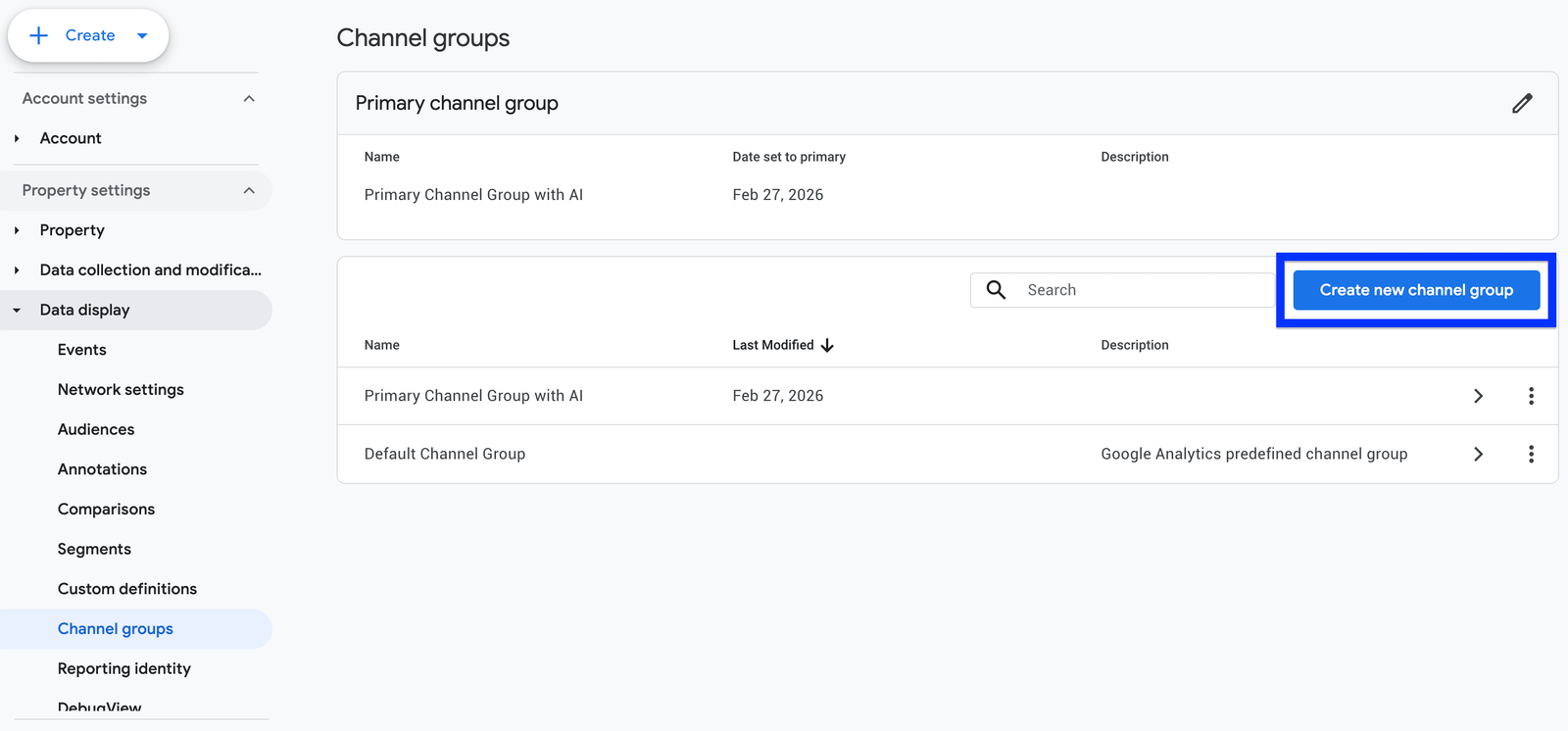
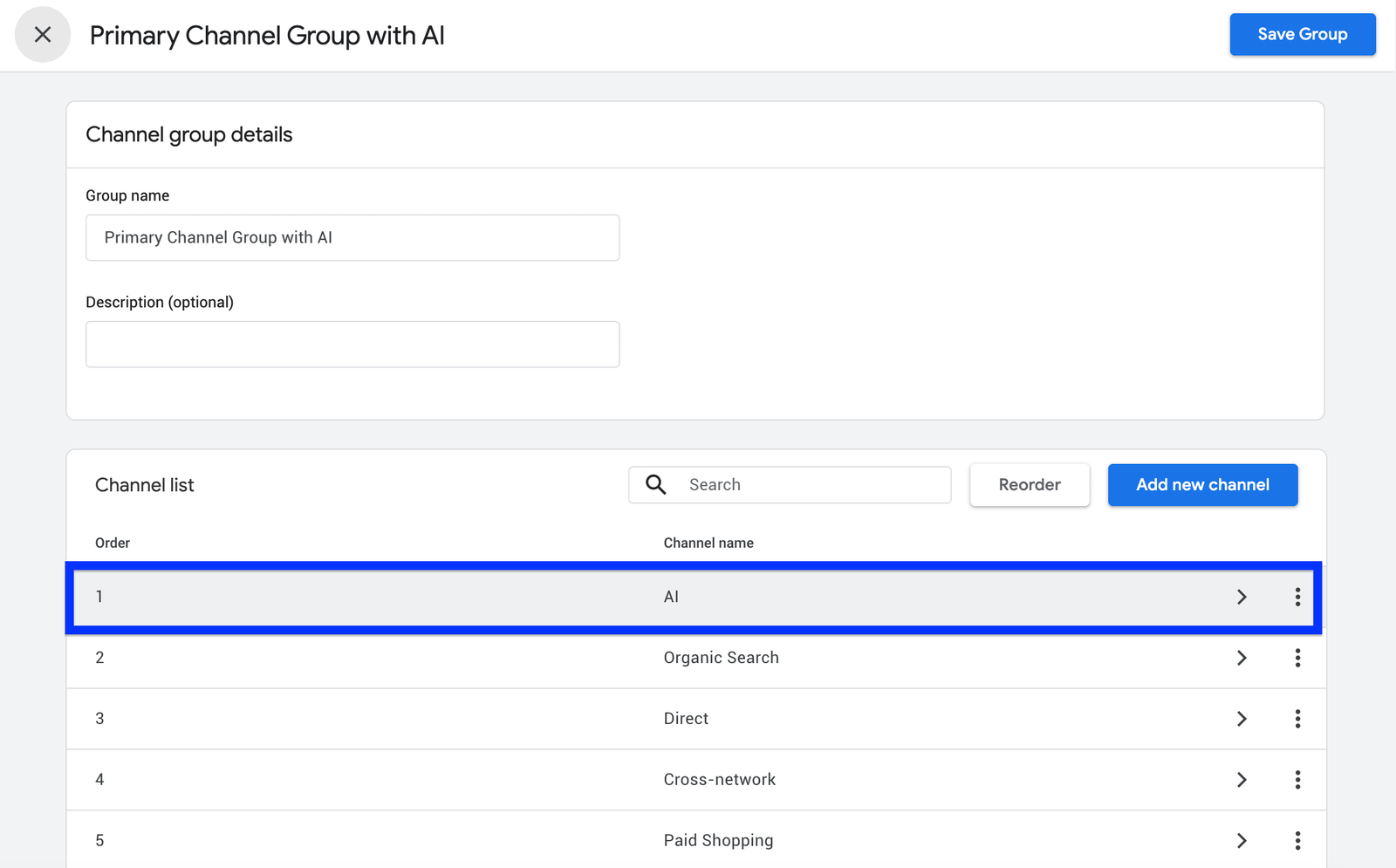
2. Add a channel and call it AI.
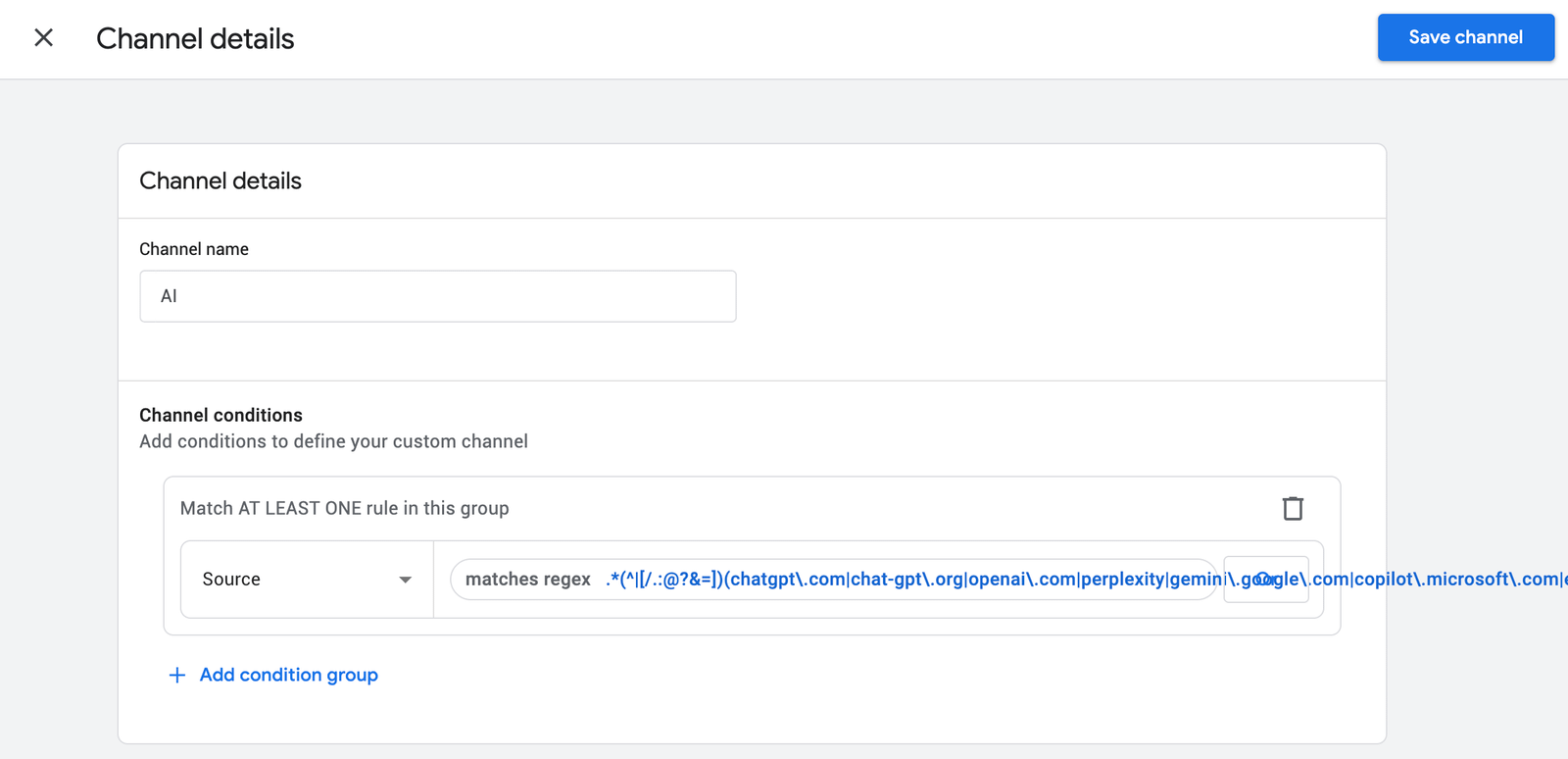
3. Set the condition to Source matches regex, with a pattern covering the AI domains.
4. Drag the AI channel above Referral and Organic, so it claims those sessions first.
5. Save, then apply the group as your primary dimension in any acquisition report.
The regex is where you can quietly sabotage yourself, so build it carefully. Keep entries tied to recognizable domains or service-specific host tokens. Never throw in a bare token like gpt on its own, because it’ll match any source that happens to contain those three letters and drag in false positives, which is exactly the sort of thing that gets your data picked apart. Here’s a boundary-aware pattern covering the major AI sources you’d want to track:
.*(^|[/.:@?&=])(chatgpt\.com|chat-gpt\.org|openai\.com|perplexity|gemini\.google\.com|copilot\.microsoft\.com|edgepilot|edgeservices|claude\.ai|deepseek\.com|grok\.com|you\.com|nimble\.ai|iask\.ai|aitastic\.app|bnngpt\.com|writesonic\.com|copy\.ai)([/.:@?=]|$).*Two quick notes on that. gemini.google.com is a specific host, so it won’t hoover up all your Google organic, which is exactly why you must never add a bare google to the list. And treat the pattern as perishable. I’d review it every quarter, because platforms come and go and their domains may change.
The Bit Even A Perfect Channel Can’t Fix
This is the part most guides skip, and it’s the part that keeps you honest. A custom channel group fixes how traffic is classified, not whether it gets collected in the first place. A source rule can only catch sessions that showed up with a source it can actually read.
The biggest blind spot is AI traffic with no referrer at all, which lands in Direct. Most of that comes from the AI mobile apps and in-app browsers, which pass nothing for GA4 to read, so there’s no source to match on.
On top of that, Google’s own AI Overviews and AI Mode get counted as Organic Search (google / organic), and Google deliberately keeps them out of the AI Assistant channel. For a lot of sites, that’s the single biggest AI surface there is, and it’s invisible as “AI” in your reports. Don’t try to drag it into your AI channel either, or you’ll swallow up ordinary Google organic by accident. If you want to go further, social channel insights in search console covers it in detail.
So, be precise about what you’re claiming. With this custom channel in place, you’ve got a complete and consistent number for the AI sources you can actually identify. What you haven’t got is a measure of total AI influence. Whether an assistant recommended you to someone who never clicked is a completely different problem, and no channel group is going to solve it.
What I’d Do This Week
Treat the native AI Assistant channel as a starting point, not the finished product. Then:
- Add Session source/medium to a Traffic acquisition report and go looking for your AI domains spread across AI Assistant, Referral, and Unassigned. Honestly, seeing the split for yourself is half the lesson.
- Build the source-based AI custom channel group to pull the fragments back together and recover the history the native channel left behind.
- Write down a monthly baseline. With a moving platform list and a big dark slice you can’t see, the month-on-month trend will tell you far more than any single headline figure.
Google finally putting AI traffic on the dashboard is a real step forward. Just remember that the default view hands you the easy slice. The actual work now is knowing exactly which slices it’s quietly leaving out.
More Resources:
Featured Image: Roman Samborskyi/Shutterstock
2 Comments
Google Analytics Adds AI Assistant As Default Channel Group
September 12, 2026[…] Analytics added an “AI Assistant” default channel group for traffic from recognized AI chatbot referrers, with Google naming […]
How to Turn Webinars Into Your Best Lead Gen Channel in 5
September 12, 2026[…] The right ones bring the ICPs your sales team actually wants to talk to. If you want to go further, GA4’s AI Assistant channel undercounts your AI traffic: how covers it in […]